
/Blog
 TenForce Introduces AI Assistants Embedded in Daily EHS workflows
/Blog

AI Assistant for Incident Management: A Better Starting Point for Your CAPA Plan

18 · 3 · 2026 by Claire Styles

Meet our AI Assistant for Incident Management. It supports stronger corrective and preventive action (CAPA) planning by suggesting relevant follow-up actions based on incident context and past learnings, all directly inside your existing workflow.

Incident follow-up quality shouldn’t depend on who happens to be handling the case that day. Yet in reality, it often does. Time pressure, workload, or varying experience levels can lead to inconsistent action plans.

The TenForce AI Assistant provides a better starting point for corrective and preventive actions. It helps teams respond more thoroughly without automating decisions, creating actions without confirmation, or replacing investigators.

Better prevention, without added admin

Built for high-risk environments such as manufacturing, food & beverage, and pharmaceuticals, this assistant strengthens follow-up without slowing response.

It helps you:

  • Create actions that address likely causes and recurring patterns
  • Reuse past learning instead of starting from scratch
  • Apply consistent rigor across incidents and sites
  • Spend less time asking “what should we do next?”

The goal isn’t speed alone (although it does reduce the time spent defining actions); it’s more thorough incident follow-up.

Prevention becomes less dependent on individual experience, and repeat incidents become less likely.

How it works inside your workflow
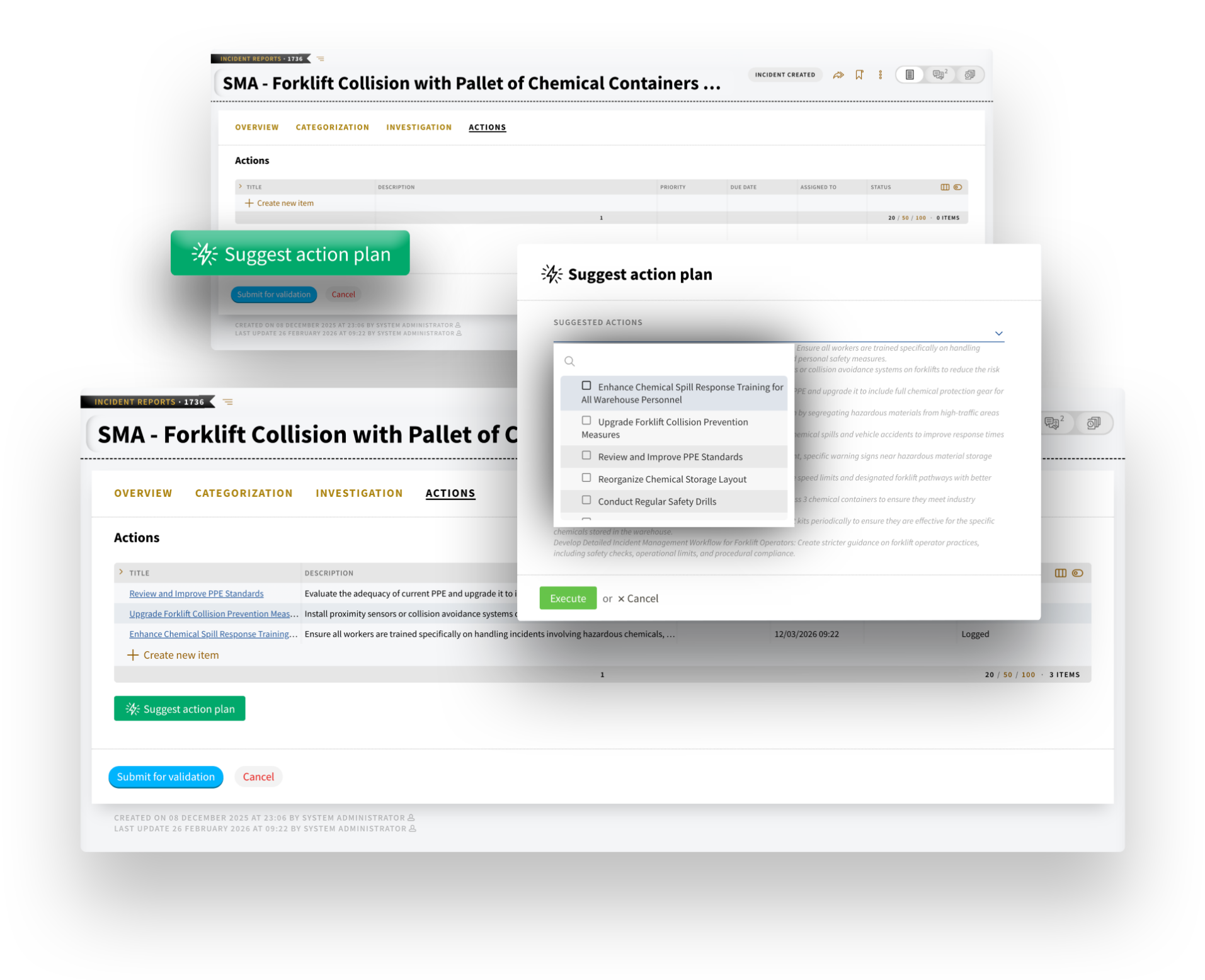
AI for Incident Management AI for Corrective and preventive Actions

When you create or update an incident report, you can trigger the AI Assistant with one click.

It reviews

  • The incident overview and categorization
  • Investigation findings
  • Immediate actions already taken
  • Existing actions already defined

Based on this context (and relevant historical patterns), it suggests additional corrective and preventive actions in a simple dropdown list.

You decide what applies. The selected actions are then created and linked to the incident, ready for you to refine before the action plan is launched. Ownership, deadlines, prioritization, and details remain fully in your control.

Nothing is created automatically; there is no hidden logic, and sensitive injury documentation is not accessed. The workflow stays the same, and the responsibility stays with your team. But the quality of your CAPA plans improves.


Over time, action plans become more consistent. Learning travels across teams and sites. Incident management shifts from reactive reporting to structured prevention.

If you’d like to explore how it fits into your current workflow, or how it could support a new implementation, get in touch with our team.

Privacy Preference Center

Required
Always Active

These cookies are needed to provide basic functionalities as you browse around the TenForce website. These capabilities include cookie preferences, load balancing, session management, language selection and checkout processes. These cookies ensure the site is performing the requested task and collect data for audit purposes. The information that is collected is aggregated for analysis.

Example Functionality Allowed
  • Enable cookie consent collection and enforcement Remember log-in to provide secure transactions across web pages, provide secure log-in, cloud systems management, authentication, load balancing, user interface language/font preferences and single sign-on
  • Keep track of the user's input while filling online forms, shopping carts for the duration of the session or for up to 24 hours after the session
  • Remember your transaction progress for the duration of the session
  • Multimedia content player cookies, used to store technical data to playback video or audio content, for the duration of a session
  • Third‑party social plugin for sharing logged‑in state for members of a social network.
Example Functionality NOT Allowed
  • Remember your log-in details
  • Remember what is in your shopping cart
  • Make sure the website looks consistent
  • Allow you to share pages with social networks
  • Allow you to post comments
  • Serve ads relevant to your interests

Functional Cookies

These cookies are used to capture and remember user preferences on the TenForce website for a longer period of time and enhance the usability of our websites or to pre-fill forms. The information is aggregated for analysis for anonymous users, but if you sign-in, we keep the data provided to perform the functions requested. Additionally, we use data to enable social interactions and site optimization.

Example Functionality Allowed
  • Enable cookie consent collection and enforcement
  • Remember log-in to provide secure transactions across web pages, provide secure log-in, cloud systems management, authentication, load balancing, user interface language/font preferences and single sign-on
  • Keep track of the user's input while filling online forms, shopping carts for the duration of the session or for up to 24 hours after the session
  • Remember your transaction progress for the duration of the session
  • Multimedia content player cookies used to store technical data to playback video or audio content, for the duration of a session
  • Third‑party social plugin for sharing logged‑in state for members of a social network.
  • Remember your log-in details
  • Remember what is in your shopping cart
  • Make sure the website looks consistent
Example Functionality NOT Allowed
  • Allow you to share pages with social networks
  • Allow you to post comments
  • Serve ads relevant to your interests

Personalization Cookies

These cookies are used to improve the overall experience of your visit to the TenForce, by personalizing messaging based on browsing history, profile data, purchase history and improve our social media and paid media marketing campaigns. The data collected is aggregated for analysis for anonymous users, but if you sign-in, we keep the data provided to perform the functions requested.

Example Functionality Allowed
  • Enable cookie consent collection and enforcement
  • Remember log-in to provide secure transactions across web pages, provide secure log-in, cloud systems management, authentication, load balancing, user interface language/font preferences and single sign on
  • Keep track of the user's input while filling online forms, shopping carts for the duration of the session or for up to 24 hours after the session
  • Remember your transaction progress for the duration of the session
  • Multimedia content player cookies used to store technical data to playback video or audio content, for the duration of a session
  • Third‑party social plugin for sharing logged‑in state for members of a social network.
  • Remember your log-in details
  • Remember what is in your shopping cart
  • Make sure the website looks consistent
  • Allow you to share pages with social networks
  • Allow you to post comments
  • Serve ads relevant to your interests