
/Blog
 New in TenForce: A Clearer Way Through Every Workflow  1 job opening
/Blog

Bring Short Term Contractors Into Your Permit-to-Work Process

9 · 10 · 2026 by Claire Styles

When an agency sends someone for a single job, they probably won’t have a TenForce account. And if they’re only there for the day, setting one up may not make sense. But your team still needs to collect their details, share the job information, and get their sign-off before work starts. And that shouldn’t mean chasing agency emails and paper forms outside your permit workflow. 

Our new ad hoc contractor add-on lets you include these workers in your Permit to Work process without setting up regular TenForce accounts. Record who’s doing the work in your usual permit workflow, then share the job details, hazards and permit conditions, and collect their sign-off on the permit printout. 

Get the job ready before the worker arrives 
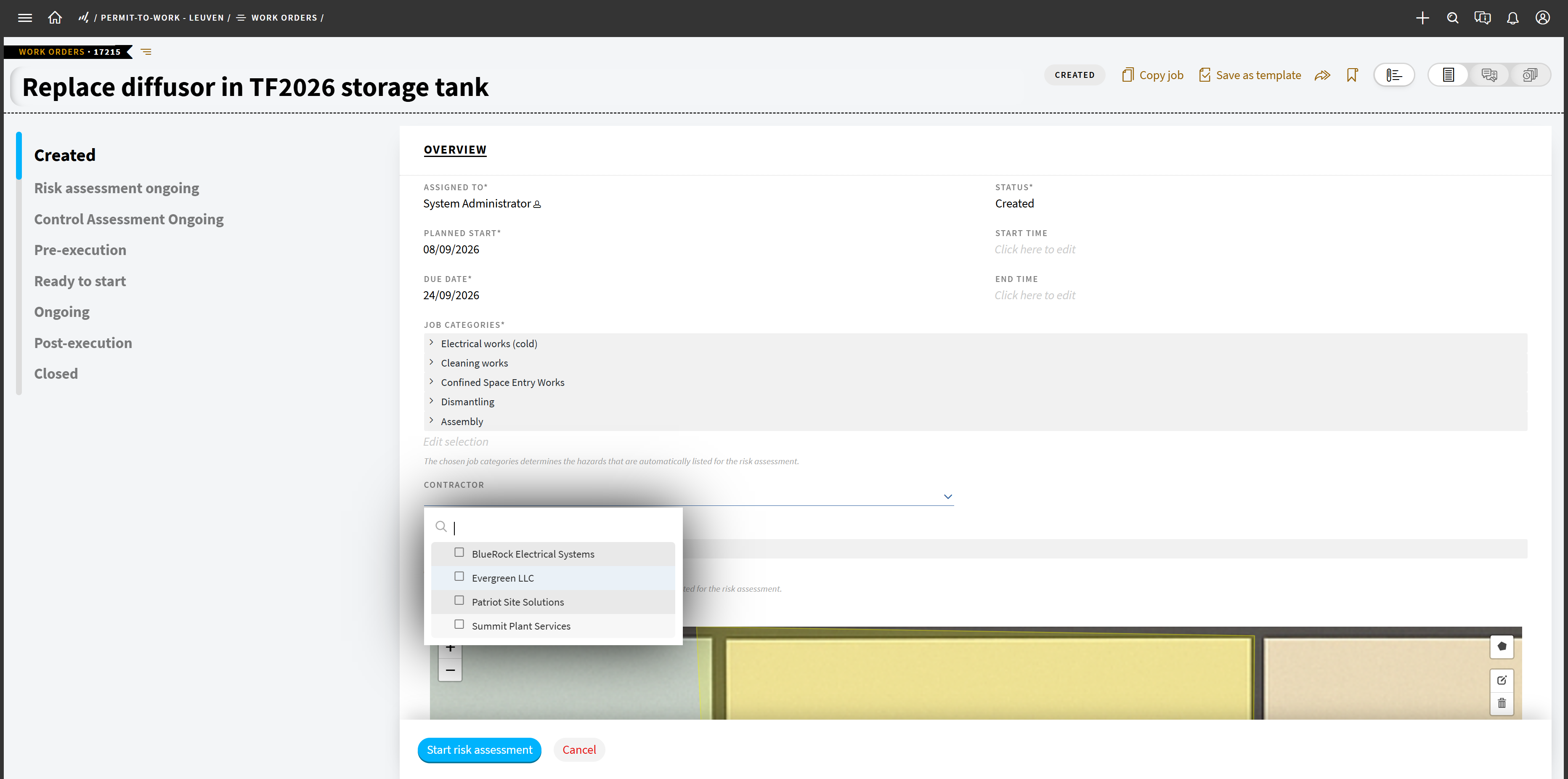
A screenshot of TenForce Permit to Work software, showing how to add ad-hoc contractors to a work permit.

You’ve got a repair scheduled, and an agency is sending a contractor for the day. You need their details and paperwork ready for the person issuing the permit. 

With the add-on, you can flag the need for temporary labor on the job or work order and add the worker’s details to the permit as they become available. These details stay connected to the job, so your permit team can follow up on anything missing before the worker arrives. 

Go through the job with the worker 

Before the contractor arrives, you complete your usual permit workflow, listing the hazards involved and the precautions your contractor will need to take. Once they arrive on site, you can share the printed permit, complete with the relevant job and permit information and a section to collect their details and sign-off. 

That way, the worker gets the instructions for their task, and their sign-off stays with the permit so your team can check what they’ve acknowledged. 

Less chasing before work starts 

Even if a contractor is only on-site for a day, they still need the job details, hazards and permit conditions—and you still need a clear record of their involvement. Our new add-on brings them into the permit process without creating a trail of separate emails and forms.

With the add-on, you can: 

  • Know who’s doing the job. Record temporary workers against the relevant permit, even if they’re only there for one shift. 
  • Get the job details to the worker. Share the hazards and permit conditions without setting up a regular TenForce account. 
  • Get their sign-off on the permit. Collect names and signatures on the permit printout, alongside the work they relate to. 

Want to see how it fits your site’s Permit to Work process? Talk to us about the ad hoc contractor add-on. 

Privacy Preference Center

Required
Always Active

These cookies are needed to provide basic functionalities as you browse around the TenForce website. These capabilities include cookie preferences, load balancing, session management, language selection and checkout processes. These cookies ensure the site is performing the requested task and collect data for audit purposes. The information that is collected is aggregated for analysis.

Example Functionality Allowed
  • Enable cookie consent collection and enforcement Remember log-in to provide secure transactions across web pages, provide secure log-in, cloud systems management, authentication, load balancing, user interface language/font preferences and single sign-on
  • Keep track of the user's input while filling online forms, shopping carts for the duration of the session or for up to 24 hours after the session
  • Remember your transaction progress for the duration of the session
  • Multimedia content player cookies, used to store technical data to playback video or audio content, for the duration of a session
  • Third‑party social plugin for sharing logged‑in state for members of a social network.
Example Functionality NOT Allowed
  • Remember your log-in details
  • Remember what is in your shopping cart
  • Make sure the website looks consistent
  • Allow you to share pages with social networks
  • Allow you to post comments
  • Serve ads relevant to your interests

Functional Cookies

These cookies are used to capture and remember user preferences on the TenForce website for a longer period of time and enhance the usability of our websites or to pre-fill forms. The information is aggregated for analysis for anonymous users, but if you sign-in, we keep the data provided to perform the functions requested. Additionally, we use data to enable social interactions and site optimization.

Example Functionality Allowed
  • Enable cookie consent collection and enforcement
  • Remember log-in to provide secure transactions across web pages, provide secure log-in, cloud systems management, authentication, load balancing, user interface language/font preferences and single sign-on
  • Keep track of the user's input while filling online forms, shopping carts for the duration of the session or for up to 24 hours after the session
  • Remember your transaction progress for the duration of the session
  • Multimedia content player cookies used to store technical data to playback video or audio content, for the duration of a session
  • Third‑party social plugin for sharing logged‑in state for members of a social network.
  • Remember your log-in details
  • Remember what is in your shopping cart
  • Make sure the website looks consistent
Example Functionality NOT Allowed
  • Allow you to share pages with social networks
  • Allow you to post comments
  • Serve ads relevant to your interests

Personalization Cookies

These cookies are used to improve the overall experience of your visit to the TenForce, by personalizing messaging based on browsing history, profile data, purchase history and improve our social media and paid media marketing campaigns. The data collected is aggregated for analysis for anonymous users, but if you sign-in, we keep the data provided to perform the functions requested.

Example Functionality Allowed
  • Enable cookie consent collection and enforcement
  • Remember log-in to provide secure transactions across web pages, provide secure log-in, cloud systems management, authentication, load balancing, user interface language/font preferences and single sign on
  • Keep track of the user's input while filling online forms, shopping carts for the duration of the session or for up to 24 hours after the session
  • Remember your transaction progress for the duration of the session
  • Multimedia content player cookies used to store technical data to playback video or audio content, for the duration of a session
  • Third‑party social plugin for sharing logged‑in state for members of a social network.
  • Remember your log-in details
  • Remember what is in your shopping cart
  • Make sure the website looks consistent
  • Allow you to share pages with social networks
  • Allow you to post comments
  • Serve ads relevant to your interests