From Audit Agenda to Signed Report: What’s New in TenForce
There’s a lot more to running an effective audit than a good checklist. Auditees need to know when they’re involved and what evidence to prepare. Auditors need clear responsibilities and a reliable way to turn findings into action.
The latest updates to TenForce Audits & Inspections help your teams plan, conduct, and close audits with less back and forth by bringing audit types, agendas, roles, findings, actions, and final reporting into one connected process.
TL;DR: What’s new at a glance
- Audit types: Manage basic inspections, internal audits and external audits through the same solution.
- Audit agendas: Set the date, time slot and responsible person for each audit topic.
- Multiple auditors: Record the lead auditor and supporting auditors involved.
- Structured findings: Classify outcomes as positive or negative observations, or minor or major nonconformities.
- Integrated audit reports: Generate a consistent final report containing the audit details, findings, conclusions, and follow-up requirements.
- A more consistent action form: Create actions from the audit view using the familiar TenForce new-item form.
- An improved audit experience: Create and link findings and actions more easily, with key information visible directly in the checklist.
With these updates, you’ll spend less time chasing people and rebuilding records, avoid audit-day surprises, and move faster from fieldwork to an accurate final report.
Use the right approach for your assessment
A workplace inspection, an internal compliance audit and an external certification audit serve different purposes. Each has its own scope, criteria, participants and level of preparation. They shouldn’t all be forced through the same setup.
That’s why TenForce now supports three audit types:
- Basic Inspection: Check a specific activity, work area, piece of equipment, or working practice.
- Internal Audit: Assess compliance, management system effectiveness, and opportunities for improvement.
- External Audit: Manage an assessment carried out by a customer, certification body, regulator, or other external party.
When administrators configure an audit template, they can define which audit types it supports. That means, when you create an audit, you select the type, and TenForce shows only the relevant templates.
Auditors start with the right structure and checklist, and you can bring all your assessments into one system instead of relying on separate tools or workarounds.
Get the right people ready at the right time
Audits can quickly stall when the right subject matter expert isn’t available, or an auditee arrives without the required records, evidence, or documentation. When you need input from operations, maintenance, quality, HR, and other teams, preparation can easily turn into a long chain of emails and calendar checks.
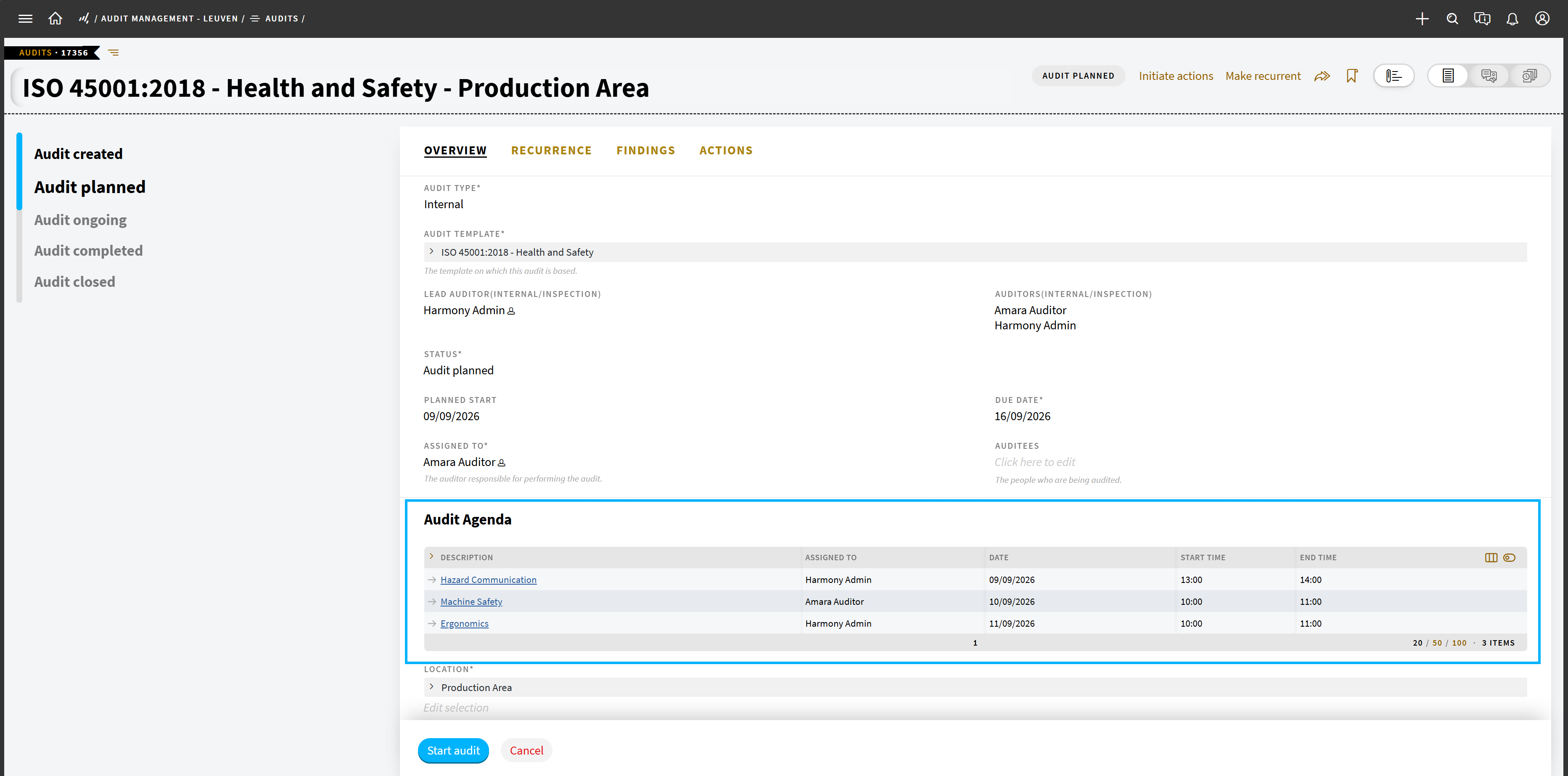
The new audit agenda helps you coordinate each topic in advance. Once an audit reaches the Audit Planned stage, the audit administrator can assign:
- The responsible person
- The planned date
- The time slot
Auditors and auditees can see these details from the audit overview. Once the audit starts, the same information remains visible alongside each topic in the checklist. If plans change, the audit administrator can update the agenda from one place.
Everyone knows when they’re needed, which topic they’re covering, and what they need to prepare, which means fewer audit-day delays.
Keep multi-auditor audits on track
In large organizations, audits rarely depend on one person. A lead auditor may coordinate the overall assessment while other auditors review the topics that match their expertise.
A lead auditor may coordinate the overall assessment while other auditors review the topics that match their expertise.
TenForce now lets you record one Lead Auditor and multiple supporting Auditors. You can update the audit team when plans change and include external auditors even when they don’t have a TenForce account.
Auditees know who they’re working with, EHS managers can keep the team aligned, and the completed audit retains a clear record of everyone who took part.
Act on the most important findings first
A positive practice, a minor gap, and a major nonconformity require different responses. Auditors need to show what they found and how significant it is, so the business can take proportionate action.
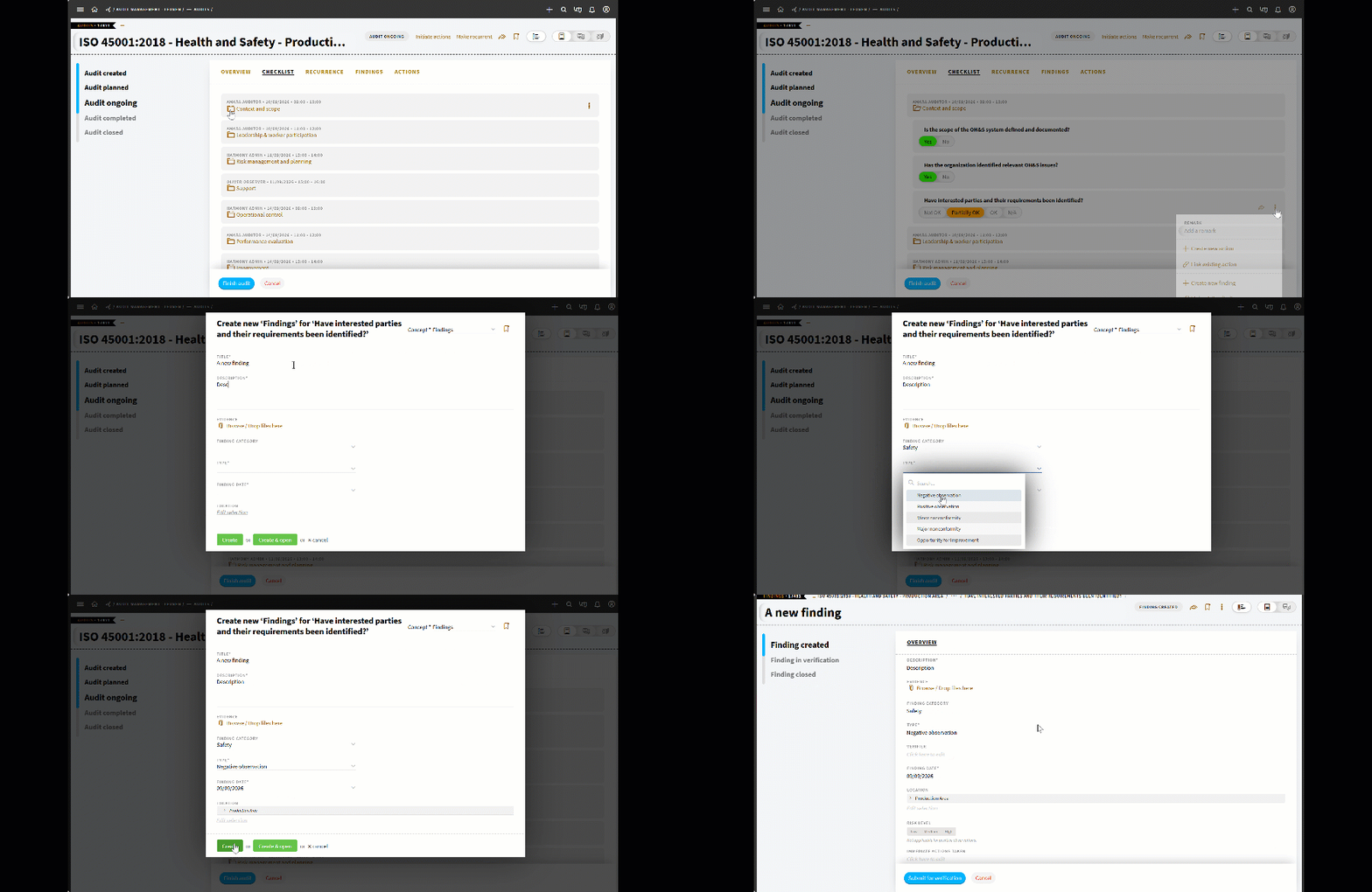
The new Findings concept replaces Observations and lets auditors classify each outcome as:
- Positive observation
- Negative observation
- Minor nonconformity
- Major nonconformity
The finding type appears directly on the card, so auditors, auditees and EHS managers can immediately see what needs action and how urgently.
Your team can escalate major nonconformities, assign proportionate follow-up to less significant issues and recognize good practices worth repeating.
Turn findings into action while you’re still auditing
When an auditor identifies an issue, they can create the follow-up action directly from the audit checklist while the details are still fresh.
Use the standard TenForce new-item form to capture the required information and assign a priority. The priority then appears on the action card in the audit view.
Auditors can move straight from finding to follow-up without switching processes or copying information into another system. This keeps the context intact, gives the responsible team a clear starting point, and reduces the risk of actions getting lost after the audit.
Finish the audit without rebuilding the report
Once fieldwork ends, auditors shouldn’t have to spend days copying findings, conclusions and actions into a separate document.
In TenForce, you can generate the final audit report directly from the information captured during the audit. Bringing together:
- How the audit was conducted
- What the audit found
- The conclusions reached
- Corrective actions and other follow-up requirements
The report is then ready for sign-off and can be issued to the audited team.
This shortens the gap between completing the audit and communicating the results. It also reduces omissions, keeps the report aligned with the underlying audit record, and gives auditees a clear account of what needs to happen before formal closure.
Manage the complete audit process in one place
These updates help auditors and auditees work from the same information throughout the process:
- Before the audit: Choose the appropriate audit type and template, prepare the agenda and confirm who needs to participate.
- During the audit: Keep the schedule, scope, and responsibilities visible while recording structured findings and actions.
- After the audit: Generate a consistent report and keep follow-up requirements connected to the original assessment.
For EHS teams, that means less time spent coordinating documents and people, and more time focused on what the audit is meant to achieve: addressing nonconformities and driving continual improvement.
Want to see our Audits & Inspections module at work? Watch our on-demand Audits and CAPA webinar for a full walk-through.