
How to Stop the Hidden Double Work Behind OSHA Reporting
In many organizations, OSHA recordkeeping still sits too far outside the incident process. Whether you’re reporting a recordable case on the OSHA 300 Log and OSHA 301 Incident Report within days or preparing the OSHA 300A at year-end, the problem is the same: the information has to come from somewhere.
But if injury details, classifications, employee information, days away or transferred, and worked hours are managed separately from the incident record, teams end up doing double work. They have to chase details, check decisions, and rebuild information into OSHA-ready formats instead of working from one reliable source. That scramble usually starts much earlier than the reporting deadline. It starts with how incident data is captured and managed from the beginning.
A missing field, a vague description, or a slight difference in how sites classify similar cases might not seem critical at the time. But when those records need to support OSHA reporting, small gaps quickly turn into manual work:
- filling in details after the fact
- reviewing and aligning classifications
- re-entering information into reporting templates
- validating numbers before they can be shared
And when that data lives across different systems, spreadsheets, or sites, it becomes harder to trust that everything is complete and consistent.
The quick read
You shouldn’t have to piece together your OSHA reports from spreadsheets, emails, and incomplete incident records. Capture the right information when an incident happens, and you can use the same record for your OSHA 300 Log, 301 report, 300A summary, TRIR and DART. You save time, avoid double entry, and stay ready for reporting throughout the year.
Where things tend to break down
For many teams, incident management and OSHA recordkeeping still live in separate systems. An incident is logged in one system, the investigation is documented somewhere else, OSHA logs are maintained in spreadsheets, and worked hours come from HR.
When it’s time to report, the team has to check: does the incident record match the OSHA log? Was the classification applied consistently? Are the employee details complete? Are the worked hours right? Can we explain what happened, what was decided, and what we did next?
If the answer sits across different systems, spreadsheets, and inboxes, teams waste time piecing together a story that should already exist.
A different way to think about OSHA reporting
Instead, what if reporting wasn’t something you had to prepare at the end of the year? What if it was simply the outcome of a well-structured incident process?
That shift starts at the point of incident capture. When the right information is captured from the beginning (clearly, consistently, and in a format that supports OSHA requirements) everything that follows becomes easier.
- Your OSHA 300 log takes shape as incidents are recorded.
- Your incident reports are 301-ready.
- Your 300A summary becomes a quick calculation.
Reporting becomes a direct byproduct of how you manage incidents day to day.
Why one connected system makes a difference
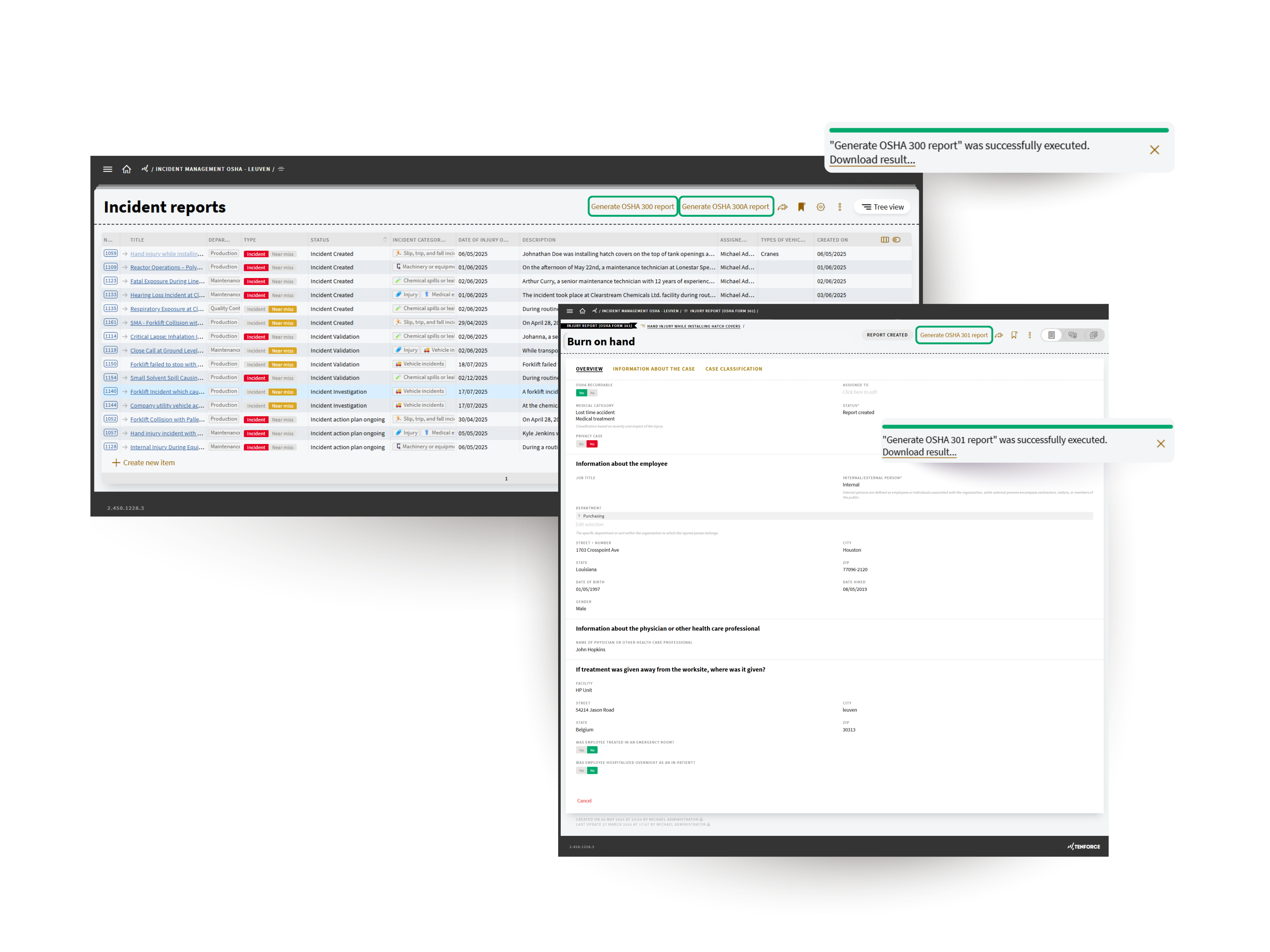
Better reporting templates can help, but the real difference comes from bringing OSHA recordkeeping into the incident management process itself.
That’s why we adapted the workflow of our Incident Management to support OSHA reporting from the start. Injury records include the fields needed for OSHA reporting, so the information your teams capture during the incident process can also support OSHA 300 logs, OSHA 301 reports, OSHA 300A summaries, and safety indicators like TRIR and DART.
That matters because the same information is reused in different ways. The OSHA 301 report holds the detailed case information. Parts of that information also appear in the OSHA 300 Log, while totals such as days away, days restricted or transferred, and worked hours feed into the OSHA 300A summary and safety metrics. When that data is structured from the start, teams don’t have to rebuild it three different times for three different purposes.
For EHS teams, that means less time rebuilding records later. You’re not copying the same information into separate spreadsheets, trying to trace an OSHA record back to the original incident, or wondering where a number came from. The information used for reporting comes from the same record your team is already using during the investigation.
With OSHA-ready TenForce Incident Management, safety teams can:
- Capture OSHA-relevant injury details from the start
- Keep employee, injury, and case information more consistent
- Generate OSHA 300, 301, and 300A outputs with less manual rework
- Track TRIR and DART using the same incident data foundation
- Keep corrective actions tied to the original case
- Support electronic submission to OSHA through the portal/API
That last point matters. OSHA reporting shouldn’t sit apart from the work that actually improves safety. Corrective actions need to stay tied to the original case, so teams can see not only what was reported, but what was done in response.
From compliance task to operational process
When recordkeeping sits outside the incident process, it becomes an administrative task: something to complete, check, and file away. But when it’s built into the way incidents are managed, the same record can support reporting, investigation, follow-up, and prevention.
For EHS teams, that means fewer gaps to chase, more consistent information across sites, and greater confidence when reports need to be shared, reviewed, or explained.
It also means OSHA records can work harder. They’re not just there to prove compliance. They become part of how your team understands what happened, what was done, and what needs to improve.
A more practical way to work
Good OSHA reporting doesn’t start with forms or spreadsheets. It starts with how incidents are captured, structured, and managed. With TenForce Incident Management, that structure is built in from the beginning—so reporting doesn’t need to be reconstructed later.
When that foundation is in place, and everything lives in one connected system, reporting stops being something you scramble to complete at year-end. It becomes something you’re already ready for, every day.
See the approach in action in our on-demand session with the Steel Manufacturers Association. We walk through a real incident scenario and show how better data supports reporting, follow-up, and OSHA 300/300A submissions.