A Clearer Way to Capture Audit Findings in TenForce
Audits and inspections are meant to give you a clear view of what’s really happening on site. But often, the most useful findings don’t fit neatly into a checklist. For instance, an auditor may spot an issue that wasn’t part of the prepared questions, or a finding may require follow-up before it gets lost in the handover between inspection, review, and action.
That’s why our latest Audit & Inspections updates focus on making audits easier to complete, review, and act on. With a clearer desktop view, support for observations, and the option to add remarks directly to audit questions, auditors can capture better information. And managers get a more complete picture of what’s happening across their sites.
TL:DR: What’s new at a glance
Here’s a quick overview of what’s new in the Audit & Inspections module:
- Improved Audit View – a clearer desktop view, built around the way auditors work through checklists.
- Support for Observations – capture findings, concerns, or positive remarks that don’t fit into prepared checklists, and follow them up in their own workflow.
- Remarks on audit questions – add extra context directly to question tiles, so answers are easier to understand and review later.
A smoother audit view on desktop
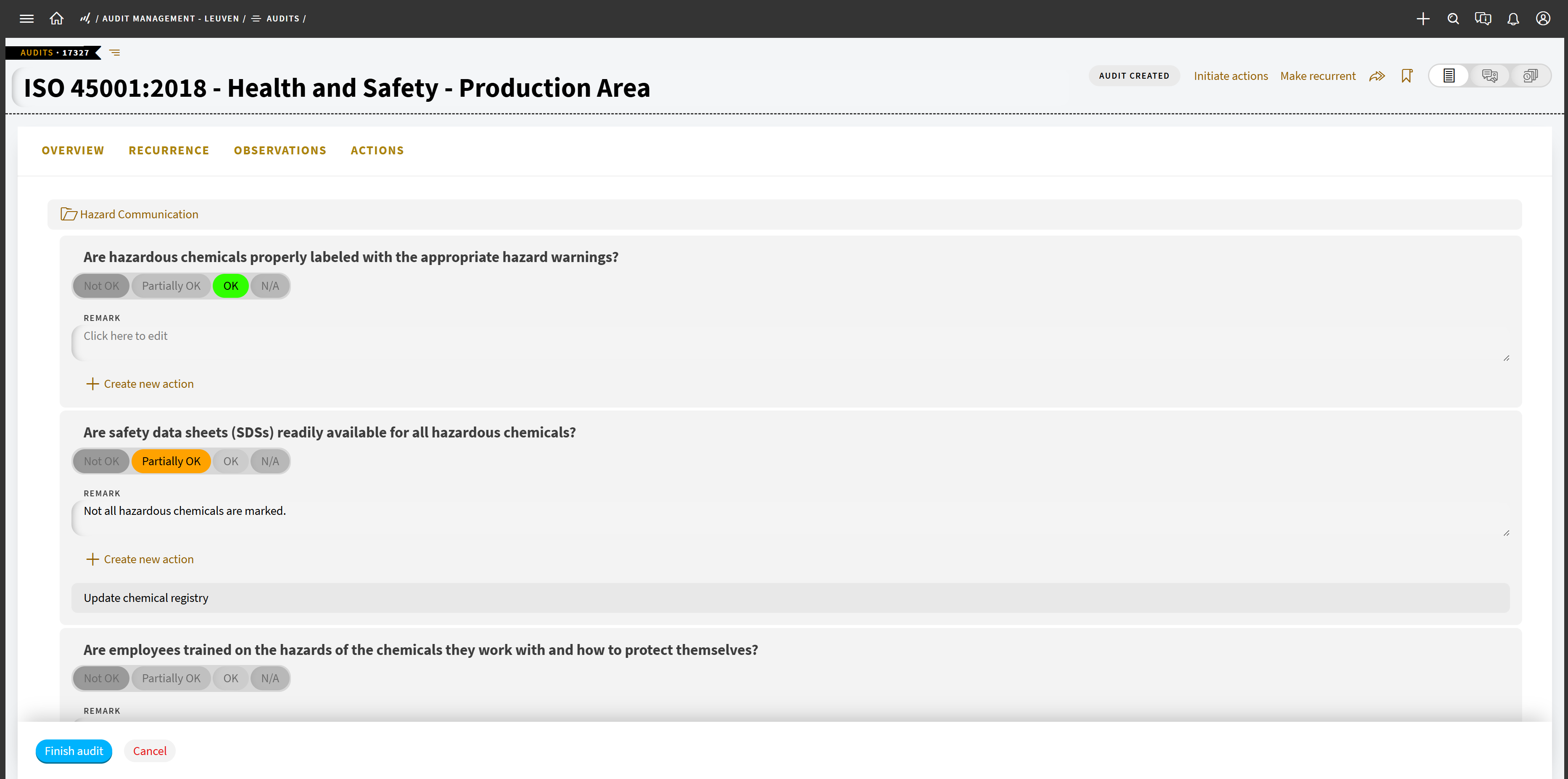
We’ve introduced an improved view for desktop users, designed specifically for audit and inspection work. Now, instead of simply working through a rigid checklist layout, auditors get a view that makes it easier to move through questions, provide answers, add remarks, and create actions where follow-up is needed.
This matters because an audit is only useful if the findings lead to action. With the improved view, auditors can create actions while reviewing a question, so the follow-up stays connected to the issue that triggered it. For EHS managers, that means clearer audit records, easier review, and less chance that important actions get missed after the audit is closed.
Capture observations outside the checklist
During an inspection, an auditor might notice a housekeeping issue in a nearby area, a positive safety behavior worth recording, or a concern that isn’t part of the prepared audit questions. Until now, these kinds of findings could be difficult to capture in a structured way. That’s where Observations come in.
Observations give auditors and inspectors a way to report findings or remarks that are related to the work, but not necessarily part of the checklist. They can be linked to an ongoing audit or created as stand-alone observations when something needs to be recorded outside a planned audit or inspection.
Each observation can then follow its own workflow, with its own verification and closure process. That means it can be reviewed and followed up without blocking the original audit from being completed.
This helps create a more complete picture of what’s happening on site because you aren’t just capturing what the checklist asks for, but what your people are actually seeing on site.
Add more context to audit answers
Sometimes the answer in an audit doesn’t tell the full story. For instance, a machine area may pass inspection but still need attention soon or a finding may not require immediate escalation, but it still deserves a note for the person reviewing the audit later.
With the new remark field on question tiles, auditors can now add extra context directly where they answer the question. These remarks are also added to the item detail of the question itself, so the information stays connected to the audit record.
That helps give you a clearer picture of what was found, why it matters, and what may need to happen next.
Better audit records, clearer follow-up
Together, these updates help make audit management more practical for real site work.
Auditors can add context while the details are still fresh. Inspectors can log important observations, even when they fall outside the checklist. Managers can review findings with more confidence and see which actions need attention.
Want to see the Audit Management updates in practice? Watch our on-demand Audits and CAPA webinar for a full walkthrough of the flow in TenForce.